
Helping volunteers spend less time coordinating and more time contributing.

Contrib centralizes project information, tasks, and collaboration into a single platform, reducing coordination overhead and helping volunteers contribute with confidence.

Role

Product designer

Time

7-8 months

Team

Independent Product Designer

Tools

Figma, Claude Code (AI-assisted prototyping)

01

The Impact

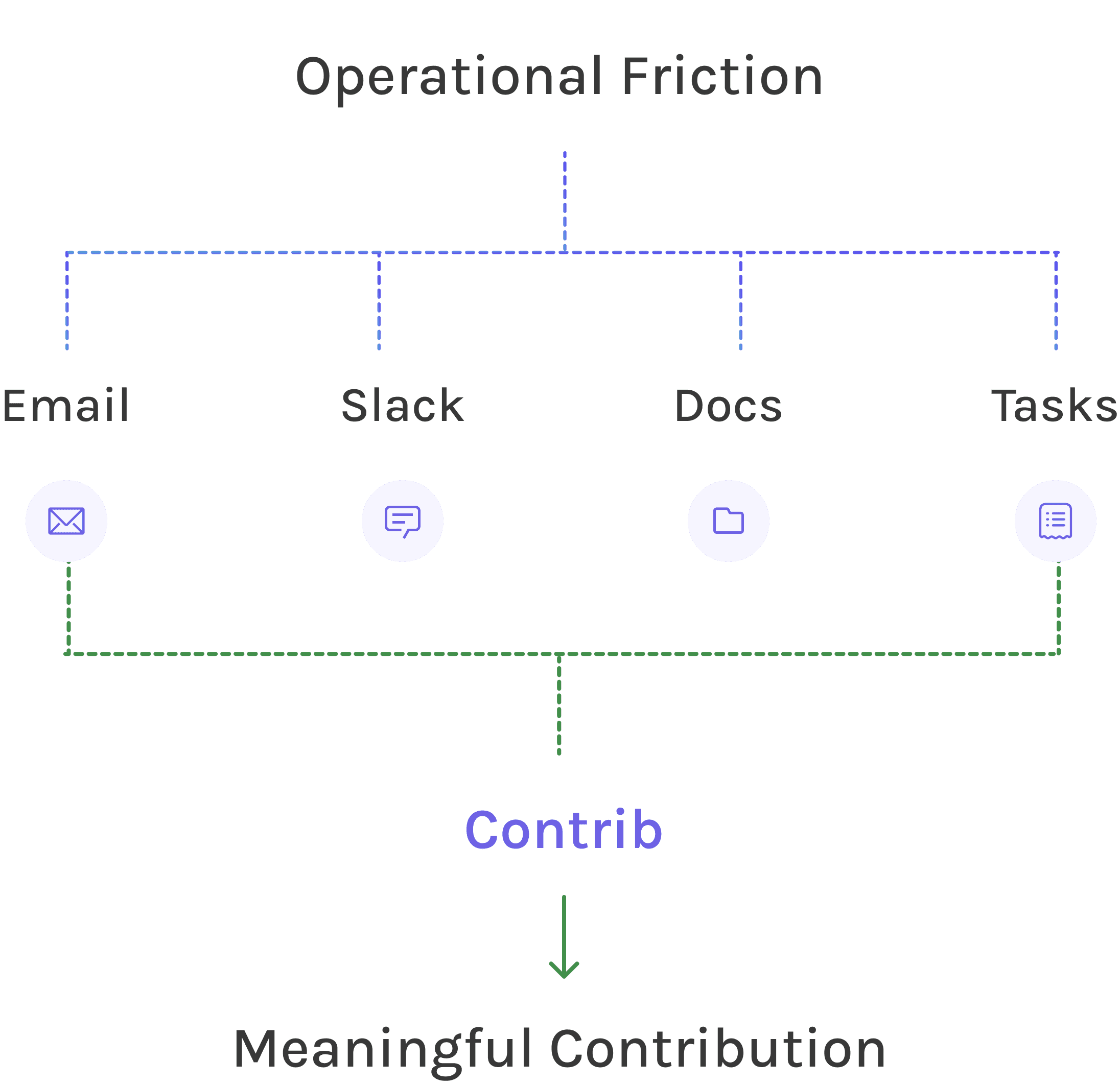
Contrib reduced operational friction by centralizing project information, enabling volunteers to spend less time coordinating and more time contributing.

Reduced Operational Friction

Volunteers spend less time searching for information and more time contributing to meaningful work.

Clear Information Architecture

A clear information architecture centralizes project knowledge, making it easier for volunteers to navigate projects as teams and initiatives grow.
02

The Problem

The Problem

The work wasn’t difficult to find - the context was.

Project information lived across conversations, documents, task trackers, and meetings. Before volunteers could contribute, they first had to piece together what was happening, what was expected, and where their work belonged.

The work wasn’t difficult to find - the context was.

Project information lived across conversations, documents, task trackers, and meetings. Before volunteers could contribute, they first had to piece together what was happening, what was expected, and where their work belonged.

Understanding the volunteer workflow

8+

Volunteer Interviews


Captured firsthand experiences and collaboration challenges.

Volunteer Interviews


Captured firsthand experiences and collaboration challenges.

Affinity mapping


Synthesized qualitative insights into recurring themes.

Affinity mapping


Synthesized qualitative insights into recurring themes.

22+

22+

Survey responses


Validated recurring patterns across a broader volunteer group.

Survey responses


Validated recurring patterns across a broader volunteer group.

Workflow Mapping

Identified collaboration bottlenecks across the volunteer journey.

Workflow Mapping

Identified collaboration bottlenecks across the volunteer journey.

Key Insights

03

Key Product Decisions

Design for volunteer needs, not project management workflows.


  • The Challenge:

    Traditional project management tools focus on organizing work. Volunteers, however, first needed to understand the project, collaborate with teammates, access resources, and find meaningful ways to contribute.


  • The Approach

    Design a platform around the complete volunteer experience by bringing together project context, collaboration, learning, support, and tasks into one place instead of treating task management as the primary goal.


  • How it shaped the Product

    Contrib brings project context, collaboration, learning, support, and task management into a single experience, helping volunteers understand where and how they can contribute.


Design for volunteer needs, not project management workflows.


  • The Challenge:

    Traditional project management tools focus on organizing work. Volunteers, however, first needed to understand the project, collaborate with teammates, access resources, and find meaningful ways to contribute.


  • The Approach

    Design a platform around the complete volunteer experience by bringing together project context, collaboration, learning, support, and tasks into one place instead of treating task management as the primary goal.


  • How it shaped the Product

    Contrib brings project context, collaboration, learning, support, and task management into a single experience, helping volunteers understand where and how they can contribute.

Design for meaningful contribution, not just task completion.


  • The Challenge:

    Completing tasks wasn't enough to create an engaging volunteer experience. Volunteers also needed clarity, motivation, recognition, and guidance throughout their journey.


  • The Approach

    Design experiences that reinforce progress, reduce unnecessary friction, and help volunteers focus on meaningful contribution rather than simply checking off tasks.


  • How it shaped the Product

    This philosophy influenced decisions across the product - from prioritizing Today's Focus and balancing completed work with upcoming tasks to minimizing competitive gamification and emphasizing personal progress instead.


Design for meaningful contribution, not just task completion.


  • The Challenge:

    Completing tasks wasn't enough to create an engaging volunteer experience. Volunteers also needed clarity, motivation, recognition, and guidance throughout their journey.


  • The Approach

    Design experiences that reinforce progress, reduce unnecessary friction, and help volunteers focus on meaningful contribution rather than simply checking off tasks.


  • How it shaped the Product

    This philosophy influenced decisions across the product - from prioritizing Today's Focus and balancing completed work with upcoming tasks to minimizing competitive gamification and emphasizing personal progress instead.

04

The Solution

Bringing the volunteer experience into one unified platform.

Instead of juggling scattered tools, volunteers can now access everything they need—from project context and daily priorities to learning, collaboration, and support - within a single experience designed around meaningful contribution.

Bringing the volunteer experience into one unified platform.

Instead of juggling scattered tools, volunteers can now access everything they need—from project context and daily priorities to learning, collaboration, and support - within a single experience designed around meaningful contribution.


05

Design Iterations

Refining the experience through continuous feedback

Throughout the design process, I iterated on key interactions based on critiques, usability feedback, and repeated design reviews.

  1. Repositioning the “Add Personal Task” action

Initially, the Add Personal Task action existed as a standalone CTA, making it feel disconnected from the content it affected. Based on critique, I moved it into the To Do List header, creating a clearer relationship with the list while reducing cognitive load and visual clutter.

  1. Setting realistic support expectations

The initial design promised a fixed response time for every support request. During critique, I realized resolution depends on the issue's nature and severity, making a universal timeline unrealistic. Instead of promising a deadline the organization couldn't consistently meet, I introduced a Request Follow-up action, allowing volunteers to check on unresolved issues when needed.

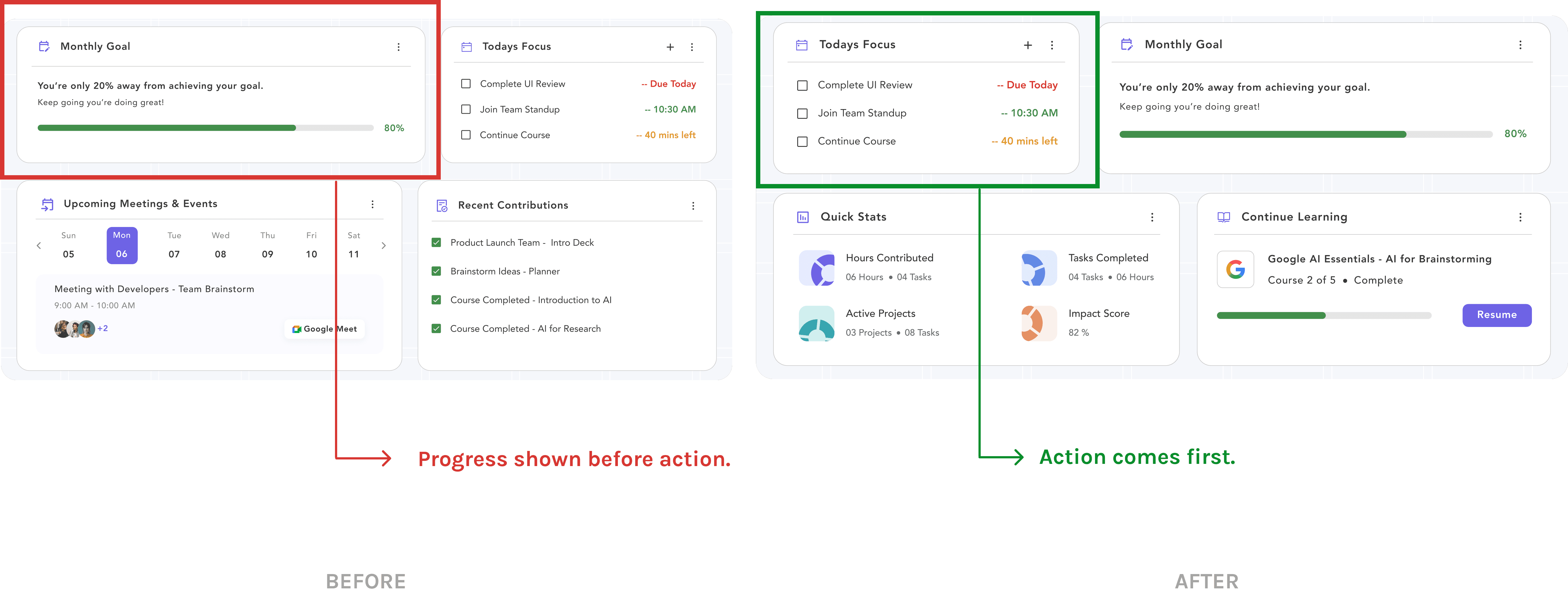
  1. Prioritizing action over progress metrics

Initially, the dashboard surfaced progress metrics before actionable work. During critique, I realized volunteers primarily log in to understand what they should do next, not to review analytics. Moving Today's Focus to the top shifted the dashboard from reporting progress to supporting action.
06

The Prototype

Interactive Prototype -

During the design process, I also developed an AI-assisted interactive prototype with Claude Code to validate interaction flows and end-to-end product behavior.

Figma prototype

07

The Reflection

Designing Contrib reinforced that meaningful volunteer experiences aren't created by adding more features - they're created by reducing uncertainty.

This project strengthened my ability to translate research into product decisions, balance user needs with organizational constraints, and make deliberate design trade-offs that support meaningful contribution.

Feel free to connect or just a hello!

Feel free to connect or just a hello!